Streaming Picks of the Week
|
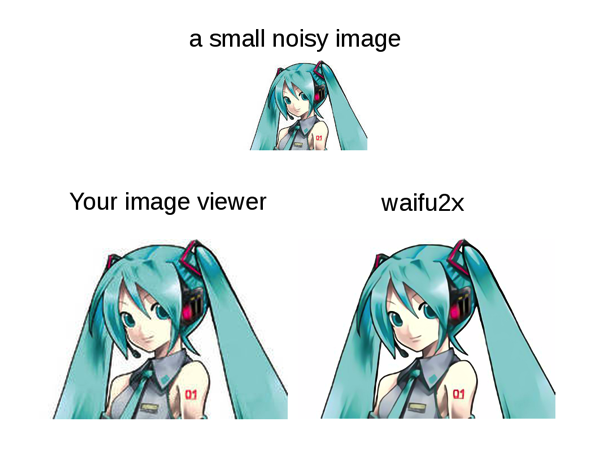 If you’re a fan of anime (and one would hope that you are, since you’re here reading this blog) then you probably have a rather large collection of anime-themed graphics files sitting on your computer and/or smartphone/tablet. Perhaps you’re using them for desktop wallpapers or a photo screensaver, or as forum avatars, or to jazz up your blog posts, or maybe you just like to sit for hours and stare longingly at your 2D waifu. (Come on guys, admit it. Confession is good for the soul.) But, odds are that many of those images are fairly low-res. (Actually this is somewhat less true nowadays, thanks to more powerful and cheaper CPUs and HD quality source material; however there are still quite a few lower-resolution images to be found out there.) And trying to view those low-res images on today’s ultra-high-res monitors is an exercise in pain and frustration. You could upscale them in a graphics program, sure, but that would end up turning a nice-looking, if small, image into a giant smeared blob of yuck that’d make you want to tear your eyes out. (Ok, I admit this is a bit of an exaggeration, but it’s true that upscaling a smaller image does make it look grainy and blotchy and pretty nasty.) So what is a red-blooded image-loving otaku to do?! If you’re a fan of anime (and one would hope that you are, since you’re here reading this blog) then you probably have a rather large collection of anime-themed graphics files sitting on your computer and/or smartphone/tablet. Perhaps you’re using them for desktop wallpapers or a photo screensaver, or as forum avatars, or to jazz up your blog posts, or maybe you just like to sit for hours and stare longingly at your 2D waifu. (Come on guys, admit it. Confession is good for the soul.) But, odds are that many of those images are fairly low-res. (Actually this is somewhat less true nowadays, thanks to more powerful and cheaper CPUs and HD quality source material; however there are still quite a few lower-resolution images to be found out there.) And trying to view those low-res images on today’s ultra-high-res monitors is an exercise in pain and frustration. You could upscale them in a graphics program, sure, but that would end up turning a nice-looking, if small, image into a giant smeared blob of yuck that’d make you want to tear your eyes out. (Ok, I admit this is a bit of an exaggeration, but it’s true that upscaling a smaller image does make it look grainy and blotchy and pretty nasty.) So what is a red-blooded image-loving otaku to do?!
Well guess what, Japanese Github user “nagadomi” has come to the rescue with a truly awesome piece of (free!) software. Waifu2x is an image processing app that uses some pretty freaky cool technology to upscale image files while preserving line detail and shading, and vastly reducing graphical glitches/artifacting. It does this using “convolutional neural networks,” a technology that even I can’t wrap my head around (and I work in the technology industry!) Basically (and this is in extreme layman’s terms) a neural network is a way for a computer system to “learn” a particular task, similar to how the human brain “learns” by forming neural pathways. Specifically, the convolutional neural network that Waifu2x uses is specially designed to simulate the way we process visual information; which explains why it’s so good at what it does (processing image files.) What exactly does it do? It is designed to optimally upscale images while preserving the strong lines that an animator uses when drawing characters’ features, etc., while minimizing artirfacting and digital noise. And the results are, in a word, stunning. Don’t believe me? Check out some of the sample images on the project page on Github. In the words of one Redditor, “[T]his performs unbelievably well on images with clean linework and shading, creating near-perfect upscales.”
And lest you think that this piece of software is a frivolous waste of time and energy, there are people using it for other (non-anime) tasks as well. It is, after all, an image upscaler, and the neural network can actually “learn” to process different types of images. One enterprising individual is using it to upscale traditional Japanese artwork that is not available in high-quality scans, only small reprints in a book. There are even some enterprising souls that are using this to upscale video as well.
Unfortunately, all this computational awesomeness comes at a rather high cost. These heavy-duty computations are too much for even the beefiest of CPUs, and requires a fairly high-grade GPU for its processing power; specifically, an NVIDIA GPU that supports the CUDA parallel computing platform and Compute Capability 3.0 or later. If you’re one of those hardcore gamers, then you’re probably set, so go ahead and download and install it! (it’s not too difficult, just follow the instructions.) But if your hardware isn’t up to snuff, fortunately the author has set up a demo site that you can try out with your own images.
 In our recent episode on budgeting for an anime convention, we recommended that you should set aside some money for those “oh crap!” type moments — accidentally overspending on something, dealing with various forms of Travel and/or Con Drama (lost luggage, roommates you just don’t get along with, etc.) and so on. Well, another (more positive) reason that you may want to keep a little bit of extra money in your budget is that, while you’re at con, you might catch wind of some cool and/or fun event that happens to be in town while you’re at con, that you might want to take an evening to go and visit. Having a little extra cash on hand makes this kind of serendipitous event possible. In our recent episode on budgeting for an anime convention, we recommended that you should set aside some money for those “oh crap!” type moments — accidentally overspending on something, dealing with various forms of Travel and/or Con Drama (lost luggage, roommates you just don’t get along with, etc.) and so on. Well, another (more positive) reason that you may want to keep a little bit of extra money in your budget is that, while you’re at con, you might catch wind of some cool and/or fun event that happens to be in town while you’re at con, that you might want to take an evening to go and visit. Having a little extra cash on hand makes this kind of serendipitous event possible.
Case in point: if you’ll be going to Anime Expo, and if you are a fan of (or are even at least a little bit interested in) Hatsune Miku and/or Vocaloid in general, then you might want to check out this cool event hosted at the Gallery Nucleus, a mere 12 miles from the LACC. “Hatsune Miku Dreams of Electric Sheep” is an exhibit being put on by Crypton Future Media in partnership with Gallery Nucleus, and features an exciting line-up of original art featuring our favorite blue-haired, leek-wielding virtual diva, Hatsune Miku. The exhibit features a large and exciting collection of original art featuring Miku & Co. done by various artists, each depicting Miku in their own unique artistic style. This collision of worlds will no doubt surprise and entertain fans and curious onlookers alike.
In addition, there will be some merchandise available for purchase, including limited-edition prints, T-shirts, a gallery exhibition catalog (which includes a download card for a special Hatsune Miku EP) and many Snow Miku goods available for the first time outside of Japan. (Another reason to have some extra cash lying about.)
The exhibit will be running between July 2, 2015 – July 19, 2015 (just in time for Anime Expo) at the Gallery Nucleus, located at 210 East Main St, in Alhambra, which is only about 12 miles from the LACC (check out the route on Google Maps or in the map embedded below this post). It’s open Tuesday through Sunday from 12 noon until 8 PM (they’re closed Mondays.) The Opening Reception, which will be held on Jul 2 from 6:00PM – 10:00PM, will feature a Hatsune Miku concert screening (tickets are $5, must be purchased online and are limited to 200, so better act quickly if you’re interested.) Otherwise, the exhibit is open to all and is completely free and does not require a reservation. (though you will need to get yourself there, either driving or public transportation, hence the “why you might need to keep some extra money around” comment earlier.)
Continue reading Going to Anime Expo? Interested in Hatsune Miku? Then be sure and check out this exhibit!
 Murphy’s Law strikes yet again here at Otaku no Podcast. (Seems to happen a lot around here.) Mere hours after we released our most recent episode — in which we talked about Anime Expo 2015 but couldn’t really give any details because the schedules weren’t out yet (and we didn’t think they’d be out until at least the middle of the month) — Anime Expo goes and drops a bombshell on us, in the form of the AX 2015 preliminary schedule. Murphy’s Law strikes yet again here at Otaku no Podcast. (Seems to happen a lot around here.) Mere hours after we released our most recent episode — in which we talked about Anime Expo 2015 but couldn’t really give any details because the schedules weren’t out yet (and we didn’t think they’d be out until at least the middle of the month) — Anime Expo goes and drops a bombshell on us, in the form of the AX 2015 preliminary schedule.
(In the fantasy world inside my head, I am imagining the AX staffers crowded around their computers, listening to the podcast, when one of them (the leader, who, naturally, has adopted the Gendo pose) calmly intones, “So, they don’t think we can release an event schedule until way closer to the event, do they? Well we’ll show them! Mwahahaha!!!” complete with that little smirk that Gendo puts on whenever he says something devious. The reality, being much more boring, is that it was probably just nothing but coincidence. 🙂 )
Anyway, yes indeed, Anime Expo announced that the preliminary schedule for AX 2015 is now available online for your viewing pleasure. With over 200 hours of programming already entered, this is definitely shaping up to be one awesome weekend — and they’re nowhere near finished filling in the schedule yet! Definitely keep an eye on it. In particular, this schedule does not include any autograph sessions, video room schedules, gaming schedules, or any event/guest/whatever that they haven’t yet announced. (Surprise 11th hour guest/programming announcements, anyone?)
Now for the bad news: there is not (as far as I can tell) a downloadable PDF version of the schedule as there has been in the past. Maybe they’ll make one available closer to the event; this is, after all, still early days. Also there is no word on whether the schedule will be made available through some sort of mobile-friendly format (hopefully Guidebook again… fingers crossed…) Again, I’m guessing that they’ll probably wait until very close to the final version of the schedule before releasing that.
However, they did set up a web portal where you can view the schedule, using the SCHED app, which they’ve used before in the past. As web portals go, it’s pretty decent. You can view the schedule in one of several formats: as a simple list of events ordered by time, as a list ordered by location (room) or as the traditional schedule grid. The events are color-coded to make identifying the various types of events (panels, main events, workshops, etc.) easy. There is a search function that lets you easily find a particular event or panel you’re looking for. And finally, you can create an account on the site, and mark down events that you are interested in, which puts them in a special “My Schedule” section for easy access. (Note: there are two ways you can register for the site; either by supplying a traditional email and password, or by using your Facebook account. I could not, for the life of me, get the email/password to work; I had much better luck going through my Facebook account.)
Go check it out today!
 Crowdfunding is one of the many unique and innovative ideas to come out of today’s Internet-savvy, high-speed connected, social media-saturated world. Crowdfunding sites such as Kickstarter and Indiegogo make it possible for a person or a group who have an idea for a cool product or service, but not a lot of money, to potentially attract interest and gain enough funding to turn their dream into a reality. It still requires a lot of effort — you still have to get noticed, which means you need to get the word out about your product — and even if you get enough backing, there’s no guarantee that you’ll be able to successfully bring your product to market — but a successfully crowdfunded project at least has a fighting chance at becoming reality. Crowdfunding is one of the many unique and innovative ideas to come out of today’s Internet-savvy, high-speed connected, social media-saturated world. Crowdfunding sites such as Kickstarter and Indiegogo make it possible for a person or a group who have an idea for a cool product or service, but not a lot of money, to potentially attract interest and gain enough funding to turn their dream into a reality. It still requires a lot of effort — you still have to get noticed, which means you need to get the word out about your product — and even if you get enough backing, there’s no guarantee that you’ll be able to successfully bring your product to market — but a successfully crowdfunded project at least has a fighting chance at becoming reality.
Crowdfunding initially gained popularity with the tech industry, with tech-related products making up the first wave of crowdfunded projects; however now other industries are waking up and taking notice of these successes, including the entertainment industry, who have successfully crowdfunded several movie & TV shows, including a few fan favorites.
Now the anime and video game industries are getting in on the action too. It seems that not a day goes by when I don’t see some news article about some crowdfunded anime or video game or whatnot. Sadly, there have been a few notable failures; still, the successes are impressive. Well, the latest one of these to garner the public’s attention is one that is particularly near and dear to our hearts, since it involves a unique animated classic that just happens to be the inspiration for the name of this very blog and podcast.
Otaku no Video, created by the folks at Gainax, is an oddball but delightful animated tale which tells the story of Ken Kubo, a normal, average-Joe college student, who one day runs into an old high school friend, Tanaka, who turns out to be a hardcore otaku. Soon he and Tanaka start hanging out and Ken finds himself drawn into the world of the otaku, to the extreme annoyance of his girlfriend and other “normal” friends. Soon Ken’s transformation is complete, and he dives headlong into his new otaku lifestyle, with the ultimate goal and desire to become “King of all Otaku,” or “OtaKing.” Interspersed with the animated segments are a series of really odd yet humorous “real-life” interviews with otaku of various persuasions (all of whom just happen to be members of Gainax.) The entire piece serves as a delightful “mockumentary”-style homage to the otaku culture, and is also, in a way, an animated telling of the history behind the studio Gainax. (And yes, like I said before, it also serves as our namesake. “Otaku no Video” can be translated as “Geeks’ Video” — hence our name, “Otaku no Podcast,” or “Geeks’ Podcast.”)
Well, as it turns out, next year is going to be Otaku no Video’s 25th anniversary, and to commemorate this momentous occasion, AnimEigo announced that they would be crowdfunding a brand new Blu-ray release of Otaku no Video, just in time for its 25th anniversary. People who back the campaign will receive the “OtaKing Edition,” which includes the entirety of Otaku no Video, presented using a gorgeous new HD transfer of the film that was created for the Japanese Blu-ray release which shipped last year. It’ll include Japanese audio and English subtitles. In addition, the disc will feature four audio commentary tracks (Japanese with English subtitles) featuring commentary from various people involved with the project. The discs will not be region-coded, and will be available to ship anywhere except Japan. Their goal is US$40,000, and if the project exceeds its funding goal, AnimEigo will also throw in some additional “stretch goal” perks, including patches, art books, dōjinshi and more. AnimEigo has successfully funded a previous Kickstarter campaign — a rather nicely-done Blu-ray release of one of my favorites, Bubblegum Crisis — so I have high hopes that they’ll succeed in this venture as well.
The Kickstarter will go live at 10 AM Eastern time on Tuesday, June 2. I’ll update this post once the Kickstarter page has gone live. In the meantime, you can check out a video that they produced (which shows off the excellent HD transfer they’ll be using) at Vimeo or via the embedded player below the cut.
Update 06/02/2015: The Kickstarter campaign is now live! Their goal is $40,000; however after less than a day of being up, they’ve already amassed over $35,000 of that! This one looks like it’s in the bag!
Update 06/02/2015 only just a little bit later than the above update: They’ve met their $40,000 goal in less than a day! Amazing!
Update 06/03/2015 late evening: This thing’s riding to number one with a bullet – not only have they exceeded their $40k goal, they’ve almost doubled it – the kickstarter is at $60,900 as I write this, and there’s still 21 days to go, if you’d still like to get in on the action.
Continue reading AnimEigo launches Kickstarter campaign to fund our namesake, Otaku no Video! (Updated)
 Yeah, I know, it’s only been a day or two since I posted our last Cool Find. Please forgive me. The reason for this, though, is a good one, as you’ll soon see: there is a time limit involved. Yeah, I know, it’s only been a day or two since I posted our last Cool Find. Please forgive me. The reason for this, though, is a good one, as you’ll soon see: there is a time limit involved.
Japan Animator Expo (not to be confused with that other Expo with a similar-sounding name) is a cool, relatively new (started in November of last year) joint venture between Hideaki Anno’s (yes, that guy) studio, Studio Khara, and
Dwango, a telecom/media group in Japan and parent company of famous Japanese video streaming site Niconico (formerly Nico Nico Douga, that offers relatively new animators exposure to a worldwide audience by giving them an opportunity to produce a series of anime shorts, with fairly little creative restrictions, which are then streamed on NND. You’ll also see a healthy sprinkling of more seasoned talent in the mix as well, in both the production side as well as the voice acting side. Still, these shorts are a great showcase of the sort of new, up-and-coming talent that is brewing in the Japanese animation industry. The animation styles and character designs are as jaw-droopingly gorgeous as they are eclectic, and the storylines/plots are just as unusual and widely varied. (You can read about some of them on the Wikipedia page.)
Japan Animator Expo will produce a total of 30 shorts, one each week. We’re currently on week 24; however some of the older videos are about to expire. At midnight Japan Standard Time (use this link to convert that to your local timezone) on the morning of Monday, June 1 (that’s less than a week from now) videos #1-12 in the series will no longer be viewable. Hopefully this venture has generated enough interest and buzz to convince them that it’s worth doing something like this again. Having this as a once-a-year event would be great, and would really spread the word and continue to bring new talent into the industry. Be sure and check them out today! (Note: unless you read Japanese, be sure to click the “EN” button at the upper right of the page.)
 Hi folks. Yes, we’re still here. Sorry for our recent hiatus. Things have been pretty busy lately. Hi folks. Yes, we’re still here. Sorry for our recent hiatus. Things have been pretty busy lately.
As I may have mentioned in the past, my attempt at getting a higher education (beyond high school) was brief and ended in tragedy. The culture shock of going from living a fairly sheltered, overprotective life at home, to the absolute freedom and chaos of life on campus was too much for me, and I let the freedom of finally emerging from behind the iron curtain of my parents’ rule get to my head, and basically crashed and burned in pretty much all of my classes. I have fortunately learned a great deal since then; but, as they say, hindsight is 20/20.
However, there was one positive thing to come out of this debacle. Coming out of a sheltered childhood, it was my first taste of what the “real” world was like, and as such, I learned a lot about how life and the real world work, and how to survive in them. I learned how to communicate and socialize with other people – not that I do it particularly well, even now, but I at least can cope in a social situation without falling over in a heap. And I also met a lot of cool friends, many of whom I remain in touch with to this day.
One particularly enjoyable aspect of dorm life that I miss even now is the long hours we spent, lasting way into the night (and often well into the next morning) sitting in our dorm rooms talking (and often arguing) about various and sundry topics such as religion, politics, current events, social/cultural issues, music, books, movies, TV shows, Mac vs. PC, or vi vs. emacs (hey, we were all computer geeks/engineers, okay?) Often these discussions would morph into arguments, and pretty heated ones at that, with each of us defending our position with a fiery passion. But these arguments never got out of hand, and we always seemed to make up (or at least agree to disagree) and return to our usual amicable (if perhaps somewhat sleep-deprived) selves by the next morning. Well, one of the many topics we discussed/argued about, perhaps with a particularly high level of passion, was, of course, anime, and I couldn’t help but reminisce fondly on these good times when I ran across today’s Cool Find, the Anime & Manga Stack Exchange.
By now you probably know that, as part of my day job, I work together with a group of friends on various computer hardware and software projects; they bring me on whenever they need some additional help. I work on various jobs and projects on the side as well. So I suppose you could say that I’m a sort of “geek gun-for-hire.” (I’ve been wanting to change my business cards to have my title say “Ninja Consultant”, but sadly my boss hasn’t been too keen on the idea.) Two websites I absolutely depend on in my line of work are Stack Overflow and Server Fault. These sites are a great way of getting help with your computer and programming questions. First of all, odds are that your question has already been asked (and answered) by someone else. But if it wasn’t, then all you have to do is submit a new question (be as descriptive as possible) and you are likely to have some answers within hours. The site is heavily moderated and is reputation-based, so answers (and questions) are usually of very high quality.
Well these two sites, as it turns out, are merely the tip of the iceberg that is the Stack Exchange Network. They host a ton of sites dedicated to all manner of topics — not just computer-y things (gaming, security, UNIX & Linux (not only in general but also Ubuntu in particular) but also plenty of non-computer-related topics, such as home improvement, photography, cooking and even bicycles! And yes, they’ve got anime covered too.
Anime & Manga Stack Exchange is, as its name implies, a place where you can ask (and answer, if you happen to know it) questions about anime & manga. What sorts of questions, you might ask? Well, if you ever had a question about a plot point, or how a character’s special ability works, or anything like that? For example (and these were picked completely at random, so they should represent no bias whatsoever) “Did Jiraiya meet Naruto by chance?” Or “What technology/jutsu do the Akatsuki members use to communicate with each other?” Or perhaps “Will Sasuke’s Kirin work against Obito?” Or even “Is Haku a man or a woman?” A site like this can help
put a stop to (or perhaps even start up) one of those long dorm-room-style “discussions” between friends (which is why I thought of that when I found this site.)
All joking aside though, the site is also a great place to ask about other, more down-to-earth topics, especially about Japan and the anime industry itself, such as “What are the anime censorship laws in Japan?” or “Do Bluray releases contain more scenes than their DVD counterparts?” In particular, it is a great place if you have one of those “name that anime/manga” type questions. Do you vaguely remember seeing an anime that looked interesting — maybe during a convention, at an anime screening room or during an AMV, or at a friend’s house, whatever — and can remember parts of the plot, some of the fight scenes, or what the main character looked like, etc., and nothing more? Well, post about it and you might just get your answer. Try and be as descriptive as possible, include pictures/screenshots if you have ’em, etc.
Like all the other Stack Exchange sites, Anime & Manga Stack Exchange is reputation-based, so not only do you need to create an account to ask and/or answer questions (it’s completely free) but you are also encouraged to vote up (or down) other peoples’ answers — and if you submit answers to other peoples’ questions yourself, your answers will be voted up/down as well. This helps keep the site friendly, open and relatively troll/flame free, as opposed to your typical web forum, which is quite refreshing if you ask me.
 Yes, I’m still here. Sorry for the lack of updates recently; this new year has been really busy for me so far. Not only have I been swamped with work, but this is also the time of year when the Southern California Linux Expo (SCaLE) occurs. I’ve been a part of the A/V staff for the past few years, and these past two months have been extremely busy with preparations for the event. Needless to say, this hasn’t left me with a whole lot of free time for various things such as anime (although I have managed to sneak in a few episodes here and there) and various other hobbies and past times, such as my other favorite, playing Japanese role-playing games (JRPGs.) But I found a pretty fun and cute little app that has helped keep me entertained and put a smile on my face. Yes, I’m still here. Sorry for the lack of updates recently; this new year has been really busy for me so far. Not only have I been swamped with work, but this is also the time of year when the Southern California Linux Expo (SCaLE) occurs. I’ve been a part of the A/V staff for the past few years, and these past two months have been extremely busy with preparations for the event. Needless to say, this hasn’t left me with a whole lot of free time for various things such as anime (although I have managed to sneak in a few episodes here and there) and various other hobbies and past times, such as my other favorite, playing Japanese role-playing games (JRPGs.) But I found a pretty fun and cute little app that has helped keep me entertained and put a smile on my face.
Dreeps (available on the iOS App Store) claims itself as the world’s first “Alarm Playing Game,” and bills itself as the perfect fit for those of us who don’t have the time to play JRPGs any more. You “control” a little robot boy as he explores mysterious lands, fights fearsome enemies, meets fellow travelers and other NPC’s, and gathers treasure and experience points. Every night, you set an alarm, and both you and your character go to sleep, regenerating lost hit points. When the alarm rings, both you (hopefully) and your character wake up and begin a new day of exploration and adventure. You can check into the game periodically throughout the day, tamagotchi-style, and see how your character is doing, or if he needs to be revived, etc. The 8-bit graphics and chip tune soundtrack are both gorgeous and charming and are very reminiscemt of many classic JRPGs such as Final Fantasy, Chrono Trigger and the like. Now, calling this a “game” is a bit of a stretch, because there isn’t really a whole lot of interaction involved. You set the alarm every night, and also, if your character gets KO’d in battle, the game will notify you and give you a chance to revive him. Still, this is still a really cute and fun app; it’s fun to check in throughout the day periodically to see what cool new area he’s exploring, or what enemies he’s fighting. Still, it might be nice if there were a little bit of interactivity added into the game; for example, getting prompted with decision points every once in a while (“Should I go to the abandoned city, or the crystal forest?”) or some tiny interactions with NPCs or something; but not too much, as the “mostly sit back and see what happens” hands-off approach is a good fit for this title.
Dreeps is available for $2.99 (c’mon folks, that’s less than the cost of one morning coffee) on the iOS App Store and is compatible with all iOS devices (iPhone, iPod touch and iPad.) Read more about it and check out screenshots at the Dreeps website and watch their trailer video on YouTube or via the player embedded below the cut.

Continue reading Cool Find: Dreeps, a cool new JRPG for those too busy to play JRPGs any more!
 I have a confession to make. (No, not that kind of confession.) When I wrote last week stating that I wasn’t able to finish my Secret Santa review on time, that may have been stretching the truth a little bit. I probably could have used one of my (very infrequent) Mental Powerups (or at the very least chugged a bottle of MORNING RESCUE!!!!) and sat down and hammered out a review; I might have even been able to get it posted before midnight on Christmas Day. But I chose not to, mainly because, in spite of the haphazard way I run this blog and podcast, I prefer to not leave anything halfway done (or done half-assedly) and I wanted to take the time and really think about what I had just finished watching before writing. But I did have one little ulterior motive: I wanted to watch my chosen Secret Santa anime, White Album 2, again. This is unusual for me because I usually prefer to wait a little while after finishing an anime before rewatching it. Also, in general, when considering which anime to watch next, I generally don’t go for the romance genre. It’s not that I actively hate this type of anime; it’s just not the first thing I think of when looking for something new to watch. Even so, some notable titles in this genre have ended up becoming some of my all-time favorites. Maybe that makes me a closet romantic; I dunno. So for me to want to rewatch White Album 2 so soon after finishing it is, in a word, unusual, and shows that it most definitely made an impact on me. So I have one more anime to add to my list of “Anime That I Really Wouldn’t Have Considered But Ended Up Watching And Really Liking.” I have a confession to make. (No, not that kind of confession.) When I wrote last week stating that I wasn’t able to finish my Secret Santa review on time, that may have been stretching the truth a little bit. I probably could have used one of my (very infrequent) Mental Powerups (or at the very least chugged a bottle of MORNING RESCUE!!!!) and sat down and hammered out a review; I might have even been able to get it posted before midnight on Christmas Day. But I chose not to, mainly because, in spite of the haphazard way I run this blog and podcast, I prefer to not leave anything halfway done (or done half-assedly) and I wanted to take the time and really think about what I had just finished watching before writing. But I did have one little ulterior motive: I wanted to watch my chosen Secret Santa anime, White Album 2, again. This is unusual for me because I usually prefer to wait a little while after finishing an anime before rewatching it. Also, in general, when considering which anime to watch next, I generally don’t go for the romance genre. It’s not that I actively hate this type of anime; it’s just not the first thing I think of when looking for something new to watch. Even so, some notable titles in this genre have ended up becoming some of my all-time favorites. Maybe that makes me a closet romantic; I dunno. So for me to want to rewatch White Album 2 so soon after finishing it is, in a word, unusual, and shows that it most definitely made an impact on me. So I have one more anime to add to my list of “Anime That I Really Wouldn’t Have Considered But Ended Up Watching And Really Liking.”
White Album 2 tells the story of high school senior Haruki Kitahara and his fellow light music club member Takeya who’ve got a big problem — all of the other club members have suddenly left the club, mere weeks before the school festival, where they had wanted to perform! Being an all-around nice guy, Haruki tries desperately to find replacements, but isn’t meeting with very much luck. Until one day, while practicing his guitar in the music room, he starts playing the chords to an old but popular song, White Album, only to be suddenly joined by a mysterious pianist and vocalist — and they sound really good together. Who are these mysterious players, and can he get them to join the band? Of course there’s much, much more to the anime, but you’ll have to watch it yourself if you’re curious, I’m not gonna spoil it for you!
(By the way, in case you’re wondering if there is a White Album 1, yes there is, but, although both it and White Album 2 take place in the same universe, they are completely different stories. They are only linked by the songs “WHITE ALBUM” and “SOUND OF DESTINY,” which were written and/or performed by the main heroines of White Album and figure prominently in White Album 2. And now you know.)
Anyway, you can probably guess by now how this review will go, but since you’re here anyway, why not stick around and continue on with my review?
Continue reading Anime Secret Santa Review: White Album 2
 Update 12/31/2014: My review of White Album 2 is now up! Omatase shimashita. Update 12/31/2014: My review of White Album 2 is now up! Omatase shimashita.
Every year I look forward to the holidays, not just because of the delicious foods, blinkenlights and the giving (and receiving) of gifts, but also for the Anime Secret Santa Project, a really cool collective anime reviewing project thingie organized every year since 2009 by the Reverse Thieves. I’ve been fortunate enough to be able to participate each year, and have enjoyed it every year, and thanks to Secret Santa, have found quite a few really good anime titles that I hadn’t considered before. And, every year, in spite of my extremely unpredictable work schedule combined with my legendary penchant for procrastination, I have always managed to get my review posted by the Christmas Day deadline, even if only just barely.
Until this year, that is.
Unfortunately, I am unable to get my review posted on time this year due to several things. For one thing, my work schedule has been incredibly busy starting right around Thanksgiving, and straight on through Christmas; usually it’s the exact opposite. Second, for some inexplicable reason, every relative on the planet decided “Gee, maybe this would be a good year to drop in on the California branch of the family!” In the past two weeks I’ve met branches of the family that I didn’t even know existed. Finally, despite my best efforts, I managed to catch one of the many seasonal cold bugs that are making the rounds, and that had me out of commission for a couple of days.
Anyway, I have told everyone involved in no uncertain terms that I will be taking the week between Christmas and New Years’ off, not just because I need the time to finish various things (such as Anime Secret Santa) but also for my own sanity. And as soon as I can tear myself away from The Family, I’ll work on finishing Secret Santa, and hope to have it posted soon. So stay tuned! And, again, my apologies. (bows his head in shame)
(ps: In case you were asking yourself “Well then, how did you manage to find the time to come up with a 12 Days of Kurisumasu pick each and every day, and more or less on time even?!” Well, after last year’s difficulties in getting entries posted every day, I wanted to find a way to post them automatically. Thankfully someone wrote a WordPress plugin that lets you automatically show/hide text on a given day, and using that, combined with a service that lets me schedule Twitter and Facebook posts to automatically post at a future date/time, I was able to write up all 12 Days entries ahead of time and have them automatically post. Sadly, this sort of automation can’t help me with Secret Santa; the level of AI technology hasn’t yet progressed to the point where an automated assistant can help me finish writing my Secret Santa review… someday maybe… sigh)
 Oh… hi there. Why, yes, it has been a while, hasn’t it? Yeah… my life has been… let’s say, “complicated” this year, and I have been ridiculously busy, and haven’t had any free time at all to devote to the website and podcast. (remember folks, unlike certain podcasters this is not my day job, and so when real, actual, paying work comes a-knockin’, everything else (including the podcast) has to take a back seat. And, now that the holidays are upon us, things are liable to get even more busy. I still do have some content coming out shortly though. I’m finally putting the finishing touches on a podcast episode that’s (almost literally) half a year in the making (basically it’s been sitting on my hard drive and needed a lot of editing, which I haven’t had very much time to do lately.) And of course, I am once again participating in the Reverse Thieves’ Anime Secret Santa project, and my review WILL come out on Christmas Day. Hopefully after the new year, things will quiet down a little and I can get back into blogging and podcasting… Oh… hi there. Why, yes, it has been a while, hasn’t it? Yeah… my life has been… let’s say, “complicated” this year, and I have been ridiculously busy, and haven’t had any free time at all to devote to the website and podcast. (remember folks, unlike certain podcasters this is not my day job, and so when real, actual, paying work comes a-knockin’, everything else (including the podcast) has to take a back seat. And, now that the holidays are upon us, things are liable to get even more busy. I still do have some content coming out shortly though. I’m finally putting the finishing touches on a podcast episode that’s (almost literally) half a year in the making (basically it’s been sitting on my hard drive and needed a lot of editing, which I haven’t had very much time to do lately.) And of course, I am once again participating in the Reverse Thieves’ Anime Secret Santa project, and my review WILL come out on Christmas Day. Hopefully after the new year, things will quiet down a little and I can get back into blogging and podcasting…
Anyway, yeah, the holidays are here. (Pauses to wait until everyone has stopped screaming in terror.) You’re probably thinking to yourself, “Oh crap! I’ve still got to get gifts for (insert name of various family members/friends/coworkers/etc. here)!!!” Or maybe you’re trying to figure out what cool items you want to get with the money you’re getting for Christmas, or the Christmas bonus your employer is giving you, or whatever. Guess what, we can help you with that! Just use one of our many affiliate links to do your online shopping. You can get your gift shopping done in the comfort of your own home/office/dorm room/secret underground lair, and avoid the gladiatorial combat arena otherwise known as “the mall.” You will also help us keep the lights on and the bits flowing. (Remember, using our affiliate links will cost you nothing extra.) Whatever type of gift you’re looking for, we’ve got it. There’s Amazon, who sells literally everything (including a rather nice selection of anime-related goods.) There’s CDjapan, for all your anime soundtrack, Jpop and Jrock needs. (They also sell some other anime-related things like figurines, character goods, etc.) And, who can forget Jlist and Jbox, who sell a staggering array of products — anime stuff (character goods, wall scrolls, etc.); traditional Japanese cultural items (bento, etc.); cosplay outfits and accessories; visual-novel and dating-sim games; calendars; Japanese snacks and drinks; Japanese kitchen tools; and, ahem, “those” kinds of things as well.)
But what if you’re having trouble deciding what to get? Well, guess what, we can help you there too. Because The 12 Days of Kurisumasu are making their triumphant return for the 2014 holiday season! In case you’ve been living under a rock (or in the desert, or deep in the Himalayas, or on Mars, or in a distant galaxy/another dimension/etc.) for the past year, and haven’t the faintest idea what the heck I’m talking about, here’s the scoop: starting on Sunday, December 14 (that’s tomorrow!) and going through Christmas Day, Thursday, December 25, I will be picking a cool new otaku-themed product each day and will be featuring it on our Twitter and Facebook. (They’ll also be posted on the 12 Days of Kurisumasu page, along with a witty (well, at least I think so) writeup.) And if you’re still clueless as to what the heck I’m talking about, you can also check out the 12 Days of Kurisumasu from years gone by at that page too.
Each product I’ll be featuring will come from one of our affiliate advertisers — Amazon, CDjapan, Right Stuf, J-List, etc. Yeah, I know what you’re saying, you’ve been waiting for the “catch” and it finally came. But as catches go, this isn’t much of one. Remember that purchasing through any of the links here costs you nothing extra but brings us a little much-needed income, which helps keep the lights on and the bits flowing.
What products will you be choosing, you might be asking. No real rhyme or reason to it, really. As long as it’s even tangentially related to anime or other otaku-worthy pursuits, then it’s fair game. That means anime DVDs (and even Blu-rays); calendars; figures; “stuff from Japan” (food, snacks, etc.); plushies; dating-sim games/visual novels; whatever. Hopefully, among this cornucopia of consumer goods, you’ll find something cool and out of the ordinary to give to any otaku-leaning friends/acquaintances you’re looking for gifts for. (Or even yourself…)
So why subject yourself to the hassle, expense and bloodletting of doing battle in the malls and on the streets, and come shop with us instead?
|
…or maybe you’d like something else instead?
|

![[Play Now!]](http://media.otakunopodcast.com/images/PlayNow.jpg)
![[View our eBay Auctions]](http://bayfeeds.com/images/Right_Now_108x45.gif)