
![[Play Now!]](http://media.otakunopodcast.com/images/PlayNow.jpg)
![[View our eBay Auctions]](http://bayfeeds.com/images/Right_Now_108x45.gif)





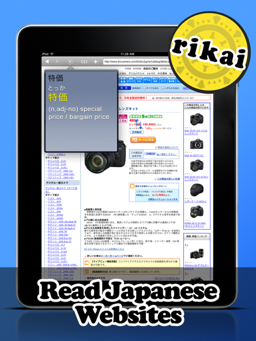
Us gaijin anime/manga/Japanese culture fans are presented with a problem, in that these works are typically written with the Japanese in mind. In other words, they are written in the Japanese language. And, I don’t know about you, but as far as languages are concerned, I probably know more Klingon than I do Japanese. (Qapla’!)
Now, this usually isn’t a problem where anime and manga are concerned, because (with any luck) your work of choice has already been (or soon will be) licensed and translated into your language of choice. But what about Japanese websites? How are you supposed to read about the latest and greatest anime, or what your favorite mangaka is up to these days? Or read the latest scintillating tales of Japanese life or insights into Japanese culture provided by your favorite random Japanese blogger? Or even navigate the wild and wonderful world of popular otaku hangouts like Nico Nico Douga or 2ch?
Sure, there are computer-based tools such as Google Translate, and they do the job… sort of… often producing something barely recognizable as some wacked-out form of English that a febrile 5-year-old would write. (But they’re usually pretty funny. Try it sometime.) Maybe barely good enough to get the gist of what the website was trying to say, if that. Also, some of these tools make a real mess of a website’s HTML code, turning a normally pretty and functional website into a jumble of nasty. And on particularly complex websites, they may not even work at all.
So what is a poor linguistically-challenged otaku foreigner to do?
Enter Rikai Browser, a free (yes, you read correctly, FREE!) browser for the iPad. Based on the same WebKit engine that powers the iPad’s native Safari browser, Rikai adds a special twist: when browsing a Japanese website, simply long-press on a word or kanji character, tap the “Rikai” button (“Rikai” is Japanese for “understand” – aha!), and the program will instantly display its English translation. It also remembers your search history and what pages you saw them on, making study and review a snap. (Yet another example of why you, the otaku, should get excited about devices such as the iPad.)
If you own an iPhone or iPod touch, and are trying to learn Japanese, you might also want to check out their Japanese Flash app. (It’ll work on the iPad as well.) This “flash card” style app makes it easy and fun to learn your Japanese words and phrases. Unfortunately this one is not free, but at $6.99 isn’t horribly expensive, and might be worth it to you if you’re struggling with your Japanese studies.
Not yet part of the iCollective? (Resistance is futile…) No problem, as long as you use the Firefox web browser, thanks to the almost as cool (and equally as free) Rikaichan Firefox plugin. Install this bad boy and soon you too will be translating Japanese characters like nobody’s business, by just hovering your cursor over the word/characters you would like to have translated. This tool, as well as the Firefox browser it runs on, is available for Windows, Mac, and Linux.
And before you Google Chrome users pull out your pitchforks and boiling oil, calm down, we’ve got something for you too – Rikaikun is essentially a port of the aforementioned Rikaichain to the Google Chrome plugin architecture, and works on any OS that Chrome runs on (namely Windows, Mac and Linux). Like Rikaichain, simply hover over the word/characters in question and up will pop a translation.
These tools are by no means perfect, but still, until someone invents the Universal Translator (or we discover that Babel Fish do in fact exist), these are certainly helpful tools that any otaku worth his or her salt should have in their linguistic toolbox.







[…] Browser was recently reviewed on Otaku No Podcast, a blog about all things Anime and Manga. We’re happy to see the Anime community starting […]
Thank you for sharing Rikai Browser with your readers.
I’d like to let you know that a new version is coming very soon that adds iPhone and iPod Touch support. The new version was sent to Apple today and will be available (hopefully) next week, the end of November.
See http://longweekendmobile.com/blog for the most up to date info.
Hi, If we may, we would like to introduce another Rikai style dictionary app, which is targeted at Windows users. We are the makers of Popup Japanese Dictionary (http://www.popupjapanesedictionary.com), a Windows Japanese dictionary application that enables the looking up of words in any application, simply by copying to the clipboard. The meaning of the copied word will appear on a popup Window, in a style similar to Rikaichan / Rikaikun. The main difference is that word lookups can be done from any screen on Windows that allows copying to the clipboard. Popup Japanese Dictionary also has useful Japanese learning features like Anki export functionality and lookup history.